Case study
Ollae
올래 · Korean for “wanna come?”
The right tool for a pickup game or team lunch is a link.


Overview
Every Thursday from May to August, I run a pickup volleyball game at my church. Anywhere from 12 to 30-plus people come, and they don't all live in the same chat. There's a Facebook Messenger group, a WeChat group for our Mandarin-speaking members, and a handful of people I invite one by one. Every week I posted the same invite in all of those places, then tallied the replies by hand. Ollae is what I built to stop doing that. The organizer describes the event in a sentence and gets a link. Anyone who opens it sees who's already coming and adds their name, plus any guests they're bringing.
The problem
Every recurring group event runs into this. Someone floats the idea, replies scatter across threads, and the organizer counts heads by hand. There's a second cost, too. People are more likely to come when they can see others are already in, and a thumbs-up in one group chat is invisible to everyone in the other.
I looked at what already exists. Google Calendar works well for a team that's fully bought in, but not everyone uses it. Partiful requires an account and is built for bigger, one-time parties, so a fancy invite every week felt like overkill. Meetup, Eventbrite, and rec-league apps all require signups and do far more than I needed. All I needed from each person was a name and a yes or no.
So the whole product follows one rule: it has to be a link. You share it the way you'd share a video, and the person on the other end can reply with nothing but their name.
Role & constraints
Role
This was a solo project. I planned it with Claude, designed the main flow in Figma with Claude's input and a shared set of design tokens, wrote the spec, and built it with Claude Code, the same way I build everything on this site. I also handled deployment and the naming, which happened twice: the original name, Showup.gg, turned out to have a pending trademark from another company. I found it the day before launch. Ollae is 올래, Korean for “wanna come?”, which is the only question the product asks.
Constraints
Not requiring accounts was a product decision, and it shaped everything downstream: how identity works, how editing works, and how the organizer gets back in. If an attendee needed an account, the product wasn't worth building. It works because these are casual events and the link only reaches people who were invited, so a name is enough identity.
Approach
Design
The RSVP flow has three states (default, selected, and success), and I designed all three in Figma before writing any frontend code. Every control sits in the lower half of the screen, where a thumb reaches one-handed. I designed it dark-mode first.
The decision I'd defend hardest is “Remind me.” The first design had three equal buttons: In, Out, and Maybe. Three equal choices invite hedging, and “maybe” gives people permission to never decide. The shipped version has two buttons, I'm in and Can't make it, with “Not sure yet, remind me closer to the date” as a small text link underneath. That changes the question to “are you coming?” while still giving an honest out to anyone who needs a day to decide. In the data, remind_me is its own RSVP status. Tapping it asks for an email address, and Ollae sends a reminder 24 hours before the event.


Figma and the Tailwind config share one set of token names. status/in in Figma is status-in in code, so nothing gets translated at handoff.
Engineering
Go and Postgres on Fly.io for the API, React 19 and TypeScript on Vercel for the app. The stack was the easy part; the work was in the edge cases.
One Claude call, two jobs
Creating an event is one text box. The organizer types the plan the way they'd type it in the group chat, in whatever order it comes to mind. Claude Haiku turns it into a title, date, start time, and location. An editable preview shows what it understood, and a plain form is available as a fallback. Nobody has to wrestle with a date picker. Because the input is just text, it works equally well with voice dictation, which keeps getting better.


The same call also picks an emoji: “volleyball at Johnson Park” gets 🏐, and “Valorant with the boys” gets 🎮. The emoji appears next to each name on the attendee list, on the success screen after someone RSVPs, and on the link preview card. It adds personality at no extra cost.


Link previews
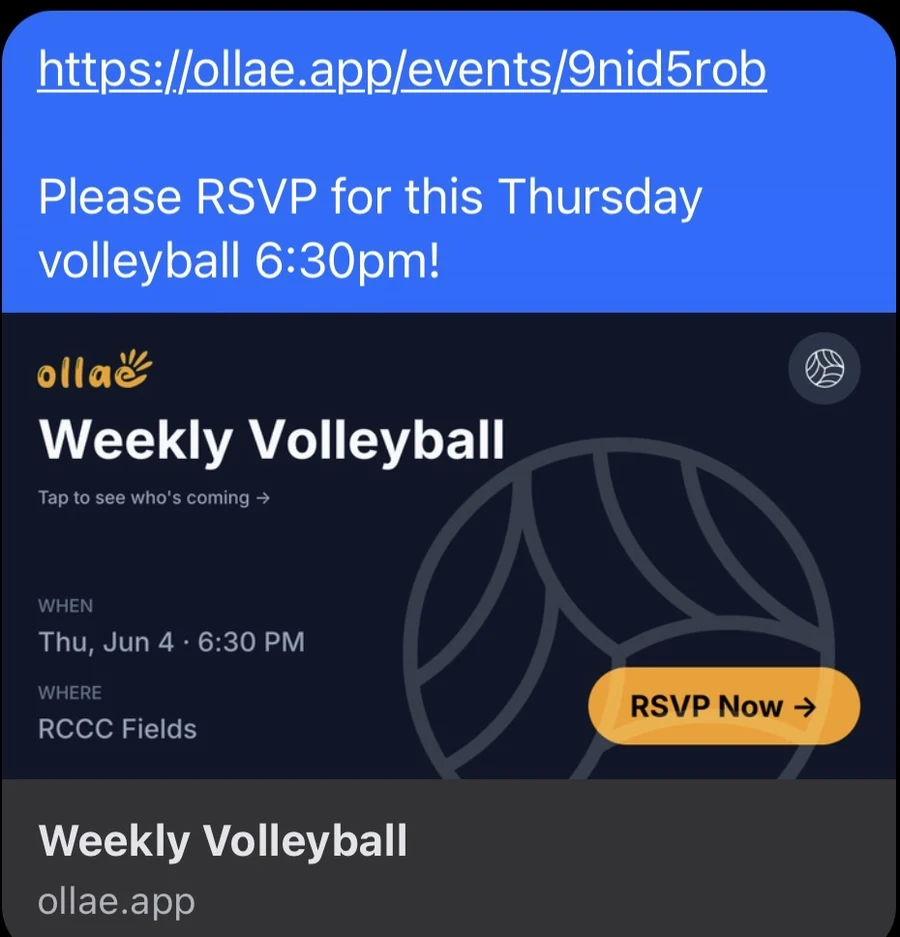
When someone pastes an Ollae link into a chat, the messaging app fetches it to build a preview, but a React app gives that crawler an almost empty page. So the handler serves preview tags to crawlers and the full app to real browsers. Each event gets its own 1200×630 preview card rendered in Go, featuring the event's emoji.
The full write-up, including the crawler detection and the query behind the organizer token, is in the repo.
Key decisions & tradeoffs
- One parse call, on submit
- One Claude call when the organizer hits Create is fast enough to feel instant. Parsing as the organizer types would feel more alive, but it would cost about ten times as much for a 15-word input, and nobody needs live feedback while typing “volleyball Saturday 2pm.”
- Store the time as typed
- Events are in person and local. A 7pm event should read 7pm to everyone, so the time is stored and displayed exactly as entered, with no timezone conversion anywhere in the pipeline.
- Organizer access is a link, too
- Creating an event returns an edit link with a random token in it, and the API accepts changes only when the token matches. Because the token sits in a URL, it shows up in browser history. For a pickup-game tool, the tappable link is worth that tradeoff, and it keeps the no-accounts rule intact.
Outcome
Ollae went into the volleyball group's chats on May 19, 2026, and the group used it that day. The first day surfaced a use case I hadn't planned for: people RSVPing for a whole group at once. Guest counts, so one person can RSVP for several, shipped a week later. Preview cards work in iMessage, WhatsApp, Messenger, and Discord.


The list under Design is live. The names on it are people who read this page.
Reflection
The timezone bug showed up twice, in different forms, and both times the cause was the same: somewhere in the pipeline a naive datetime string was being treated as UTC. The lesson is easy to state and apparently hard to remember. Decide your time semantics once, at the schema, and enforce them everywhere.
The naming cost most of a day. The trademark search should have been step one; instead it happened the day before launch. Ollae turned out to be the better name anyway.